
Business Model Canvas Generator for Startups: How AI Is Changing the Game
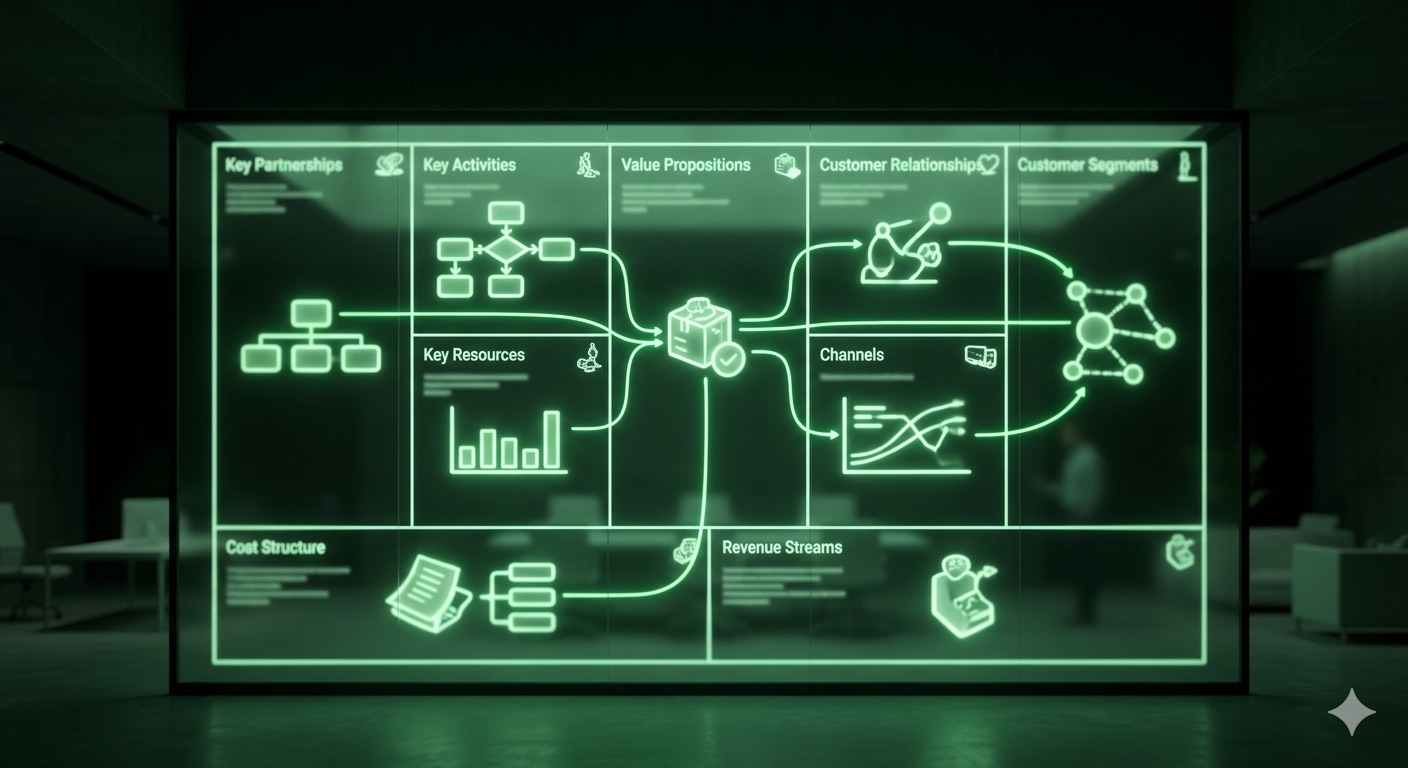
The Business Model Canvas (BMC) is arguably the most important single-page document a startup founder can create. Developed by Alexander Osterwalder, it maps the nine building blocks of any business onto a visual framework that forces clarity about how your company creates, delivers, and captures value.
But here is the problem: most founders fill it in wrong.
They treat it as a one-time exercise. They copy generic templates. They fill in aspirational statements instead of validated facts. And they never revisit it as their understanding of the market evolves.
AI-powered business model canvas generators solve these problems by guiding founders through each block with intelligent prompts, data-backed suggestions, and connections to real validation work. This article explains how to use the canvas effectively and how AI tools — particularly the Startup Ignition ToolSuite — are transforming this foundational exercise.
Table of Contents
- What Is a Business Model Canvas?
- The 9 Building Blocks
- Why Most Canvases Fail
- How AI Canvas Generators Work
- Step-by-Step: Building Your Canvas with AI
- Canvas vs. Business Plan
- Tools Compared
- Frequently Asked Questions
What Is a Business Model Canvas?
The Business Model Canvas is a strategic management tool that describes how a company creates value for customers and captures value for itself. It was introduced by Alexander Osterwalder in his 2010 book Business Model Generation and has since become the standard framework taught at business schools, accelerators, and startup programs worldwide.
The canvas is a single page divided into nine blocks. Each block represents a critical assumption about your business. The power of the canvas is that it forces you to be explicit about every major element — and to see how they connect to each other.
For startup founders, the canvas is especially valuable because it replaces the traditional 30-page business plan (which nobody reads and which is obsolete the moment you learn something new) with a living document that can be updated in minutes as your understanding evolves.
The 9 Building Blocks
1. Customer Segments
Who are you creating value for?
This is the foundation of everything else. If you get this wrong, nothing else matters. Define your customer segments with enough specificity that you could find 10 of them in the next 48 hours. “Small businesses” is not a segment. “B2B SaaS companies with 10–50 employees using Salesforce in the healthcare vertical” is a segment.
2. Value Propositions
What problem are you solving, and why is your solution better?
Your value proposition must be specific, measurable, and differentiated. “We save time” is weak. “We reduce invoice processing from 4 hours to 15 minutes” is strong. The best value propositions address a specific pain for a specific customer segment.
3. Channels
How do you reach and deliver value to customers?
This includes marketing channels (how they find you), sales channels (how they buy from you), and delivery channels (how they receive your product). Early-stage startups should focus on channels that are cheap and measurable.
4. Customer Relationships
What type of relationship does each customer segment expect?
Self-service? Dedicated account management? Community? Automated? The answer affects your cost structure, team size, and scalability.
5. Revenue Streams
How does the business make money?
Subscription, one-time purchase, freemium, marketplace commission, advertising? Each model has different implications for cash flow, growth, and customer retention.
6. Key Resources
What assets are essential to make the business model work?
Technology, intellectual property, team expertise, data, brand, capital. What do you absolutely need to deliver your value proposition?
7. Key Activities
What must you do exceptionally well?
Product development, customer acquisition, supply chain management, content creation. Focus on the 2–3 activities that are make-or-break for your model.
8. Key Partnerships
Who do you need to work with?
Suppliers, distributors, technology partners, strategic alliances. Especially important for startups that cannot do everything in-house.
9. Cost Structure
What are the major costs of operating the business?
Fixed costs vs. variable costs. Which costs scale with customers and which do not? Understanding your cost structure is essential for pricing and fundraising.
Why Most Canvases Fail
After reviewing thousands of business model canvases through our Bootcamp, we see the same mistakes repeatedly:
1. Filling It In Once and Never Touching It Again
The canvas is meant to be a living document. Your first version is a set of hypotheses, not facts. Every customer conversation, every piece of market data, every failed experiment should trigger an update to the canvas.
2. Aspirational Instead of Validated
“Our customer segment is every small business in America” is aspirational. “We have validated demand with 25 interviews among SaaS companies with 10–50 employees in healthcare” is validated. Every block should be grounded in evidence.
3. No Connection Between Blocks
The blocks are not independent — they are deeply interconnected. Your revenue streams must align with what your customer segments will actually pay. Your channels must be able to reach your specific customer segments affordably. Your cost structure must be sustainable given your revenue model.
4. Ignoring the Competitive Context
A canvas that does not account for existing alternatives is incomplete. Your value proposition is only meaningful relative to what the customer is doing today.
5. Working Alone
The canvas is most powerful as a collaborative tool. Filling it in by yourself means you are limited by your own assumptions and blind spots.
How AI Canvas Generators Work
Traditional canvas tools give you nine empty boxes and wish you good luck. AI-powered business model canvas generators fundamentally change the experience:
Guided Completion
Instead of staring at an empty “Customer Segments” box, the AI asks you probing questions: “Describe the person who experiences this problem most acutely. How often do they encounter it? What are they currently doing about it?” Your answers populate the canvas with structured, specific content.
Data-Backed Suggestions
The AI cross-references your inputs against market data, competitor information, and patterns from thousands of other startups. It might suggest: “Based on your target segment, subscription pricing between $49–99/month is typical for this category” or “Companies in this space typically acquire customers through content marketing and partnerships, not paid ads.”
Consistency Checking
The AI identifies contradictions across blocks. If your revenue model assumes enterprise sales but your channels are all self-service, the AI flags the mismatch. If your cost structure requires $500K in annual engineering spend but your market size only supports $200K in revenue, you will know before you build.
Version Tracking
AI tools let you create multiple canvas versions as your understanding evolves. You can compare your pre-interview canvas with your post-interview canvas and see exactly how your assumptions changed. This is invaluable for tracking learning velocity and communicating progress to investors.
Step-by-Step: Building Your Canvas with AI
Here is how to build a validated business model canvas using the Startup Ignition ToolSuite:
Step 1: Start with the Problem
Run your idea through the ToolSuite’s Idea Analysis tool. This establishes the problem, target customer, and competitive landscape before you touch the canvas.
Step 2: Complete Customer Discovery
Use the ToolSuite’s customer discovery tools to conduct and analyze 20–30 interviews. The insights from these conversations become the foundation for your canvas.
Step 3: Generate Your First Canvas
The AI populates an initial canvas based on your idea analysis and customer discovery data. Because it draws from your actual validation work — not generic templates — every block reflects real evidence.
Step 4: Iterate Based on Feedback
Share the canvas with mentors, advisors, or the ToolSuite’s AI mentor (“Digital John”) for feedback. Identify the weakest assumptions and design experiments to test them.
Step 5: Connect to Financial Projections
The ToolSuite links your canvas directly to financial projections. When you change your pricing assumption in the Revenue Streams block, the financial model updates automatically. When you adjust your customer acquisition channels, the CAC calculation reflects the change.
Step 6: Build Your Pitch
The validated canvas becomes the backbone of your pitch deck. Each slide maps to one or more canvas blocks, and every claim is backed by evidence from your validation work.
Build your Business Model Canvas with AI →
Canvas vs. Business Plan
| Business Model Canvas | Traditional Business Plan | |
|---|---|---|
| Length | 1 page | 20–50 pages |
| Time to create | 1–2 hours (with AI) | 2–4 weeks |
| Update frequency | Weekly or after each learning | Rarely (too painful to rewrite) |
| Audience | Founders, team, mentors, investors | Investors, banks |
| Focus | Assumptions to test | Predictions to defend |
| Best for | Pre-seed / seed stage | Later stage, bank loans |
For pre-seed and seed-stage startups — which is the focus of Startup Ignition Ventures — the canvas is overwhelmingly the better tool. Business plans have their place, but at the earliest stages, you do not have enough validated data to write a credible 30-page document. The canvas forces you to be honest about what you know and what you are still guessing.
Tools Compared
| Tool | AI Assistance | Connected Workflow | Pricing |
|---|---|---|---|
| Startup Ignition ToolSuite | Full AI guidance, suggestions, consistency checking | Connected to idea analysis, customer discovery, financials, pitch builder | Free tier, paid plans from $99/year |
| Strategyzer | No AI | Standalone | $25+/month |
| Canvanizer | No AI | Standalone | Free |
| Miro / FigJam | Basic AI | Standalone (whiteboard) | Free tier, paid plans |
| ChatGPT / Claude | General AI (not canvas-specific) | No integration | $20/month |
The key differentiator is whether the canvas tool is connected to the rest of your validation workflow. A standalone canvas is a drawing exercise. A canvas connected to your customer discovery data, competitive analysis, and financial projections is a strategic decision-making tool.
Frequently Asked Questions
Do investors want to see a Business Model Canvas?
Yes — especially at pre-seed and seed stage. Investors at Startup Ignition Ventures review the canvas as part of every evaluation. It shows that you have thought systematically about every aspect of the business, not just the product. A well-validated canvas is far more impressive than a polished pitch deck built on assumptions.
How often should I update my canvas?
At minimum, after every round of customer discovery interviews. In practice, the best founders update their canvas weekly during the validation phase. The canvas should always reflect your current best understanding, not your original assumptions.
Can I use a Business Model Canvas for an existing business?
Absolutely. The canvas is valuable for any business that wants to understand or evolve its model. Many founders in our Bootcamp use it to evaluate new product lines, pivot strategies, or expansion into new customer segments.
What is the difference between a Business Model Canvas and a Lean Canvas?
The Lean Canvas (created by Ash Maurya) is a variation that replaces Key Partners, Key Activities, Key Resources, and Customer Relationships with Problem, Solution, Key Metrics, and Unfair Advantage. Both are valid frameworks. The traditional BMC is more comprehensive; the Lean Canvas is more startup-focused. The ToolSuite supports both approaches.
How does AI prevent me from just filling in what I want to hear?
AI tools challenge your assumptions by cross-referencing against market data and asking probing follow-up questions. If you claim your TAM is $10 billion but your customer segment is a niche of 5,000 companies, the AI will flag the disconnect. It is not foolproof — no tool can prevent self-deception entirely — but it adds a layer of rigor that working alone does not provide.
 Back to All News